Coreshift Technology.

IWho owns the task?

Custom Applications

Who owns the task? What happens next? Where are things stored and accessed?

If the answer depends on opening three spreadsheets or asking the person who was here yesterday, the tool is part of the problem. We build the tool — customer records, quotes, requests, dispatch, financials, document management and project updates in one place your team uses together.

IIFour things every application gets

Four things every CoreShift application gets.

A laptop open on a dark desk showing a terminal session, warm light from one side.

Discovery

Built around your workflow

Discovery maps the roles, the data, and the decisions that need a person before anything is designed. The Blueprint you sign off is the state machine, the human gates, the integrations and the acceptance criteria.
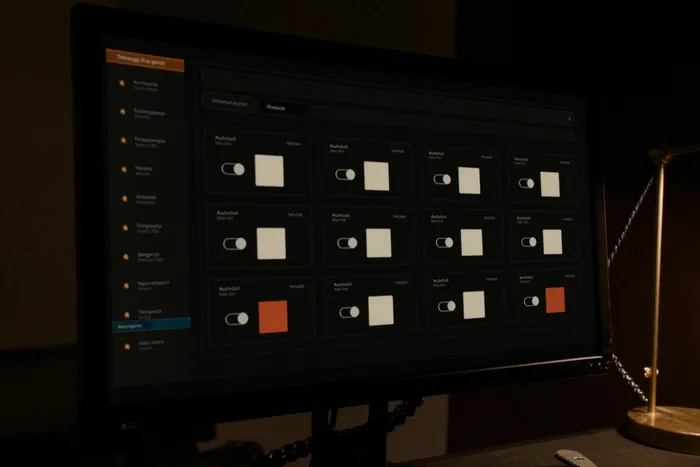
An integrations panel on a monitor, connected services shown as a grid of cards.

One codebase

Web and mobile from one codebase

Next.js for the browser, Expo for iOS and Android — the same backend and permissions behind both, so the office and the field see the same record.

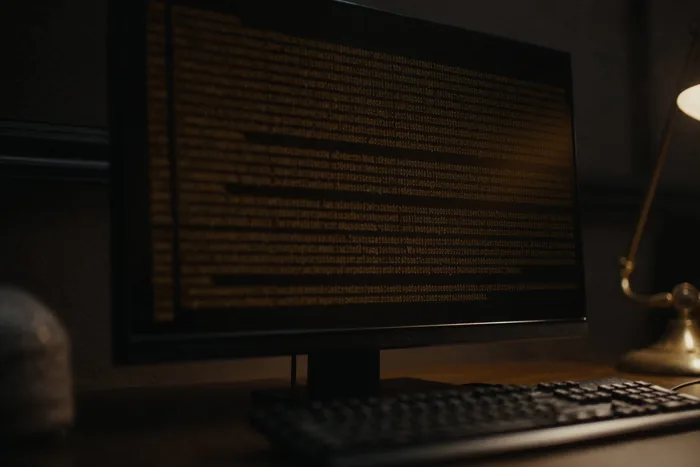
An audit log console on a monitor, rows of monospace entries in amber.

Access

Role-based access

Each role sees and changes what the Blueprint says it can, and nothing else. An administrator role is a role like any other, with its own scope.

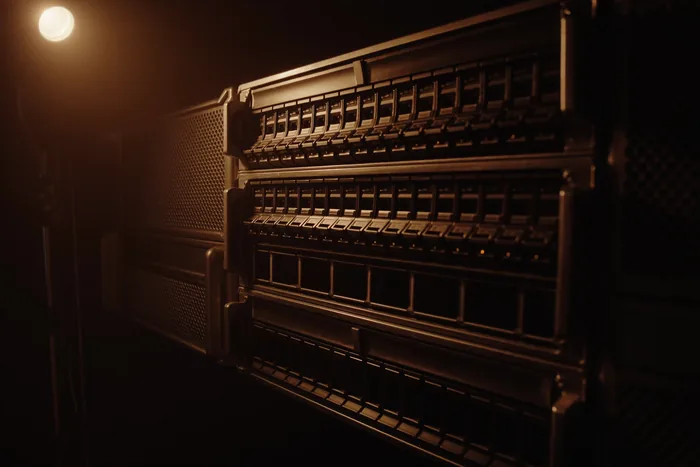
A rack-mounted storage array, rows of drive bays picked out by warm light.

Data

Your data, your schema

Schema-per-tenant isolation, scoped at the connection rather than filtered in application code. Export and code ownership are agreed in the Blueprint, so nobody discovers them at handover.

IIIWhat we build

What we build.

Internal tools and CRMs

The system your team works inside all day. Records, states, permissions, and the report someone is currently rebuilding in a spreadsheet every Monday. The example is the BMG CRM: members, leads, tasks and a dashboard derived from a mirror of the practice's commerce system.

See the BMG CRM
Internal tool · what the build covers

A record, its owner, and what it is waiting on.

Sample record
Member · Tier 2
Owner
Front office
Needs attention
Renewal due on the first
Screens
lookup, dashboard, contacts, records, tasks, settings
Roles
office, manager, administrator — each scoped in the Blueprint
States
the record's own lifecycle, and which moves need a person
Reports
the figures someone rebuilds by hand, computed in the tool
Data in
one-way mirror from the system that owns the customer
Export
full data export, agreed before the build starts

Sample record shown. Your screens, roles and states are the ones the Blueprint names.

Operations applications

Quotes, projects, dispatch, tickets, time and billing in one browser tool, so the number the owner wants is on the dashboard rather than in the bookkeeper's inbox. The example is DiegoTech Operations.

See DiegoTech Operations
Operations · what the build covers

One chain, quote to invoice.

Sample ticket
TKT-26-0104 · Sample Co-op
Tech
S. Technician
Status
In Progress — returning
The chain
quote → project → dispatch → time & expenses → billing
One record
the job keeps its own thread, so nothing is re-keyed
Dashboard
open tickets, active projects, unbilled labor, hours
Search
by ticket ID or customer name, from anywhere in the app
Roles
office, technician, owner — different views of the same record
Also inside
knowledge base and administration

Sample ticket shown. The chain is the part that is reusable; the stages are yours.

Custom mobile apps

iOS and Android from one codebase with Expo (React Native), sharing the web application's backend and permissions, so the office and the field see the same record. The example is SSA's field app: a fault alert is dispatched to a technician and the job runs from alert to invoice on one record.

Mobile app pricing
Field app · what the build covers

The job, closed from the phone.

Sample dispatch
Fault alert · Site 14
Technician
On the way
Next
Close the job from the phone
Platforms
iOS and Android from one Expo codebase
Shared with the web app
the same backend, the same permissions
Device features
camera for job photos, location — scoped in the Blueprint
Offline
what the app must do with no signal, decided up front
Distribution
App Store and Play listing, scoped in the Blueprint

Store listing, device permissions and offline behaviour are named in the Blueprint before the build.

Connections between systems

When two systems hold the same customer, the first decision is which one owns the record. The BMG WooCommerce → CRM mirror is one shape. The Precision Electric Sage bridge and Procore service account — read-only, outbound-only — are the automation-side shape.

See the Project Coordinator
Connection · what the build covers

One owner per record, and a sync you can see.

Sample source
Commerce system (one-way)
Mirror
CRM, webhook-drain
Last sync
visible on the dashboard
Direction
decided per field, so nothing is written back by accident
Owner of record
named in the Blueprint before any code is written
On failure
the sync stops loudly rather than writing a wrong value
Credentials
your accounts, scoped to the least access that works
Reviewed first
interfaces, access permissions, data quality, rate limits

Which connections we will deliver is named in the Blueprint, after reviewing what each system actually exposes.

IVThree client applications

/ applications we've built

Three client applications.
One product of our own.

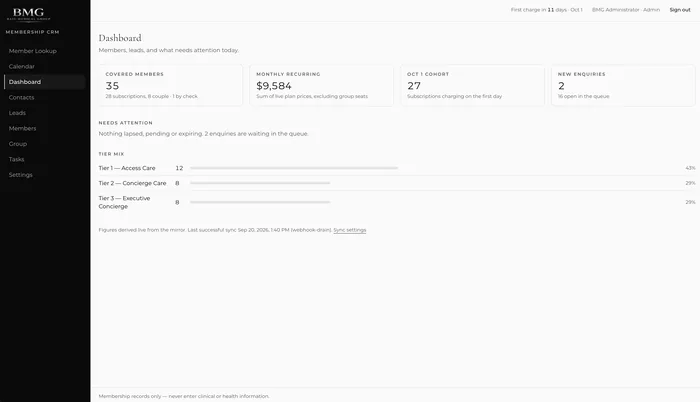
The membership CRM dashboard: covered members, monthly recurring total, needs-attention line and tier mix.
The membership CRM dashboard.

Internal tools and CRMs

Membership CRM

A membership and leads CRM built for a subscription business. Modules, in the order the app shows them: Member Lookup · Calendar · Dashboard · Contacts · Leads · Members · Tasks · Settings.

  • A dashboard with live figures: covered members (subscriptions, couples, and members who pay by check), monthly recurring revenue as the sum of live plan prices, the cohort charging on the next billing date, new enquiries and the open queue.
  • A needs-attention feed — a checkout started but never completed, for example — so a person can follow up.
  • Tier mix across the client's three membership tiers.
  • Figures derived from a one-way mirror of the client's commerce system: a one-way WooCommerce → CRM sync (webhook-drain) with a visible last-successful-sync timestamp, and manual registration for members who pay by check.
  • A staff-facing view over the three tiers. No personal health information is held in it.
  • Stack: Next.js and Prisma on MariaDB. Role-based access; an Administrator role is one of them.

The CRM itself is private and is not linked.

Read the membership CRM case
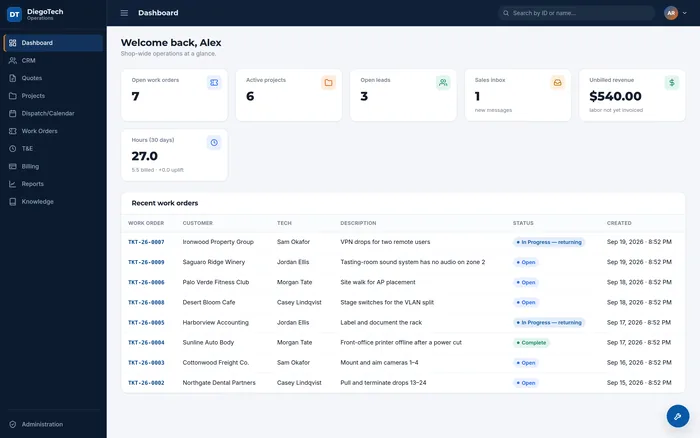
The DiegoTech Operations dashboard: open tickets, active projects, open leads, unbilled revenue, hours, and a recent-ticket table.
DiegoTech Operations. Customer and technician names on this screen are synthetic.

Operations applications · DiegoTech

DiegoTech Operations

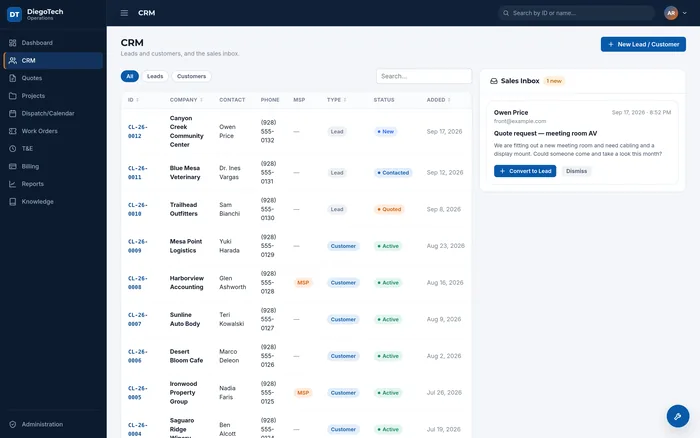
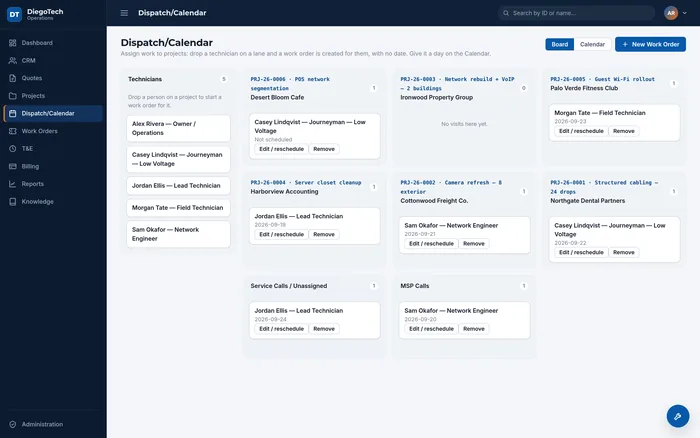
A browser-based operations application for a technology and IT services company. Modules from the sidebar: Dashboard · CRM · Quotes · Projects · Dispatch · Calendar · Tickets · T&E · Billing · Reports · Knowledge · Administration.

  • One dashboard for the shop: open tickets, active projects, open leads, a sales inbox, unbilled revenue (labor not yet invoiced), and hours over the last 30 days, billed and uplift.
  • Tickets with an ID scheme, customer, assigned technician, description, status (Open, In Progress — returning) and created time. Global search by ID or name.
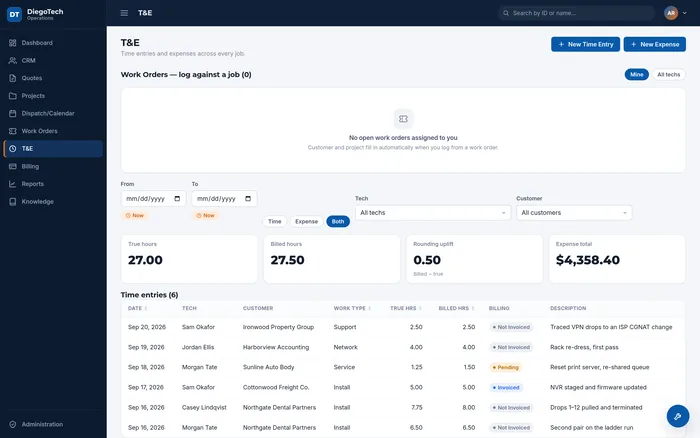
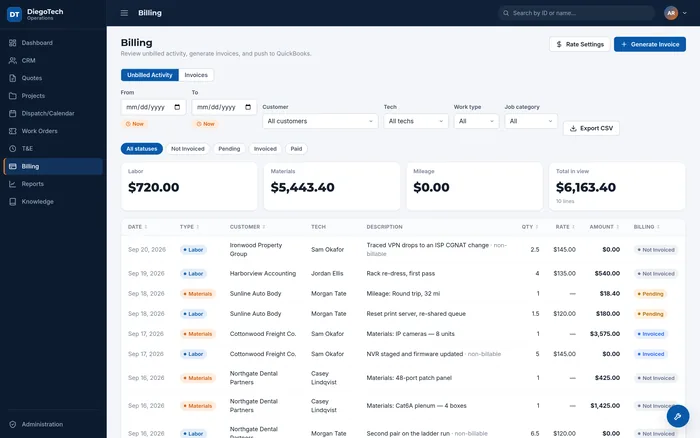
  • Quotes → Projects → Dispatch → T&E → Billing as one chain: a quote becomes a project, work is dispatched to a technician, time and expenses are logged against it, and it is billed — so “unbilled revenue” is a number the owner can see, not a question for the bookkeeper.
  • Knowledge base and administration in the same tool.
See the showcase Read the DiegoTech Operations case

/ inside DiegoTech Operations

One chain, end to end.

A quote becomes a project, a project becomes scheduled visits, a visit becomes hours and materials, and those become an invoice. Each screen below is one link in that chain.

Screens from a working installation loaded with sample records. Every company, contact, telephone number and figure in them is invented.

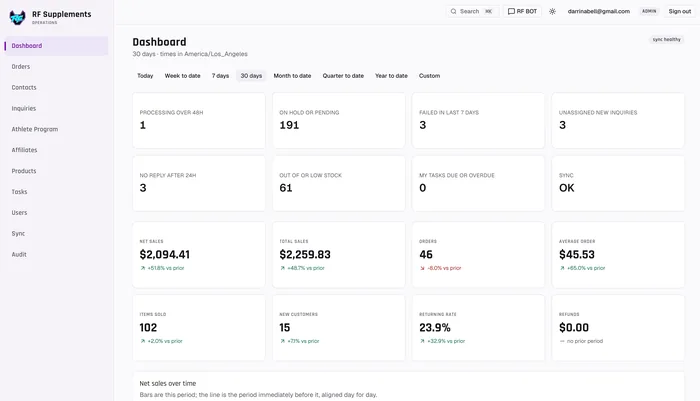
The RF Supplements operations dashboard: modules, the work queues that need a person today, and the sales summary for the period.
RF Supplements Operations, on the live shop sync.

Ecommerce operations · RF Supplements

RF Supplements Operations

The operations command centre for the business, at ops.rfsupplements.com: orders, logistics and shipping, affiliates, an athlete program, contacts and inquiries, tasks, and sales analysis, wrapped around a WooCommerce store on a live sync from the shop. Staff sign in; it is not a public site.

  • Modules from the sidebar: Dashboard · Orders · Contacts · Inquiries · Athlete Program · Affiliates · Products · Tasks · Users · Sync · Audit.
  • A dashboard of the things that need a person today: orders processing too long, on hold, failed, inquiries with no owner, no reply after a day, low or out-of-stock items, your tasks, and whether the shop sync is healthy.
  • Sales analysis over any period: net and total sales, orders, average order, items, new and returning customers, refunds, top products and top coupons, each against the prior period.
  • Affiliates and an athlete program run inside the same tool, so a referral, an application and an order are one record chain.
  • A support bot sits on top of it. See the RF Supplements support bot.

Built and deployed for RF Supplements (Sept 2026).

Read the RF Supplements Operations case

CoreShift's own product · Precision Electric is the initial tenant

SSA — Solar Service Automation

CoreShift's own multi-tenant application for solar field service, and the one place you can see all three pillars in one system. A fault alert arrives from the field, gets dispatched to a technician, and ends as an invoice — one record, one thread, no re-keying between three tools.

Around that run four things the crews actually asked for: an admin interface for the office; an error-code translation layer that turns a manufacturer's fault code into a sentence a technician can act on before leaving the yard; customer management, so the job history sits with the site rather than in an inbox; and parts management, so the truck is loaded against what the fault says is wrong. It is multi-tenant on the same isolation model everything else here runs on — one schema per tenant, scoped at the connection.

VWhat's included

What's included in every application engagement.

Screens and roles

Agreed in the Blueprint before code: every screen, every role, and what each role can see and change.

The state machine and human gates

Which states a record moves through, and which transitions wait for a person.

Integrations, named per project

The connections we will deliver are named in the Blueprint, after reviewing interfaces, access permissions, data quality and integration limits.

Acceptance criteria

Written down before the build, so the test at the end is the test agreed at the start.

Handover

Documentation, training and a full data export. Code ownership is set in the Blueprint.

Optional managed run

Hosting, monitoring and fixes, scoped separately from the build.

An application is a place to work.
Automation moves the work along.

People use an application to review records and make decisions. Automation acts on a trigger behind the scenes. A project may need either or both.

The customer sends the useful details. The website, the office, and the follow-up each have a job to do. Here is one way to connect them; you can commission any part on its own.

Website

The customer sends the useful details.

Ask what the job involves, where it is, and how to reach them. Give the office more to work with than “please call me.”

Application

The office has one request to work from.

Keep the job details, assigned person, and missing information together. The next person can pick up where the last one stopped.

Automation

The handoff has a rule.

The rule is written before anything runs, and it has two halves. The automation may act on its own when nothing is at stake: chase a missing document, or put the request in front of the person it was assigned to. It may not contact your customer on its own. So the quote is prepared and then it waits — it leaves only after the reviewer you named has approved it.

Example workflow. Your project defines the tools, connections, and approval rules.

How we work on your application.

  1. Discovery

    Map the current workflow, user roles, data, and systems. Identify the decisions that require a person.

  2. Blueprint and prototype

    Review screens, states, integrations, and acceptance criteria. Agree code ownership, data access, and delivery scope before implementation.

  3. Build and verify

    Review working slices. Test permissions, business rules, imports, failure paths, and the handoffs between systems.

  4. Deployment and handover

    Agree deployment responsibility, documentation, training, export needs, and optional hosting, monitoring, and fixes.

A clear starting point.

Custom Application

Starting from

$1,999

per project

Subject to specifics of the project. Final scope and price are agreed before work begins.

Discuss your application

What shapes the quote

  • Workflow and user roles
  • Integrations and existing data
  • Testing, deployment and handover

Ongoing hosting and support are scoped separately.

VIA few things you might be wondering

A few things you might be wondering.

Can you build around our existing systems?

We review the interfaces, access permissions, data quality, and integration limits first. The Blueprint names the connections we will deliver.

Do you build native mobile apps?

Yes — iOS and Android from one Expo codebase, sharing the web application's backend and permissions. Store listing, device features and offline needs are agreed in the Blueprint.

Who owns the code and data?

Data export and code ownership are agreed in the Blueprint. We document account access and deployment responsibilities before handover.

What should we bring to discovery?

A walkthrough of the current task, examples with sensitive data removed, the people involved, and the tools the application needs to work with.

What happens after launch?

We agree support and maintenance as part of the engagement. Managed operation can be scoped separately from the initial build.

Tell us where
the work gets stuck.

The same form as the contact page, with this service already ticked. A few sentences are enough.

What are you interested in?

Choose any that fit. It’s fine not to know yet.

A few sentences are enough. Please leave out passwords, patient information, and other sensitive records.

Whole dollars. A rough number is fine.

We use your details to respond to your inquiry. How we handle your information.

VIA few things you might be wondering

Let’s talk about the work

What are you tired
of working around?

Show us the spreadsheet, the website, or the task you keep explaining. That’s enough to start a useful conversation. Start a project